Life in the UK Test login: Fix Account Issues Fast
Life in the UK Test login not working? Use the official path, quick fixes, and account help to access bookings fast. Avoid phishing. Learn how now.
Struggling with the Life in the UK Test login? This guide shows the official path to the PSI account, the fastest safe fixes, and the current 2026 rules that matter when your account will not behave.
Start here: the official Life in the UK Test login path
Use the official GOV.UK service first. GOV.UK sets the booking rules and sends you to PSI, the current testing provider.
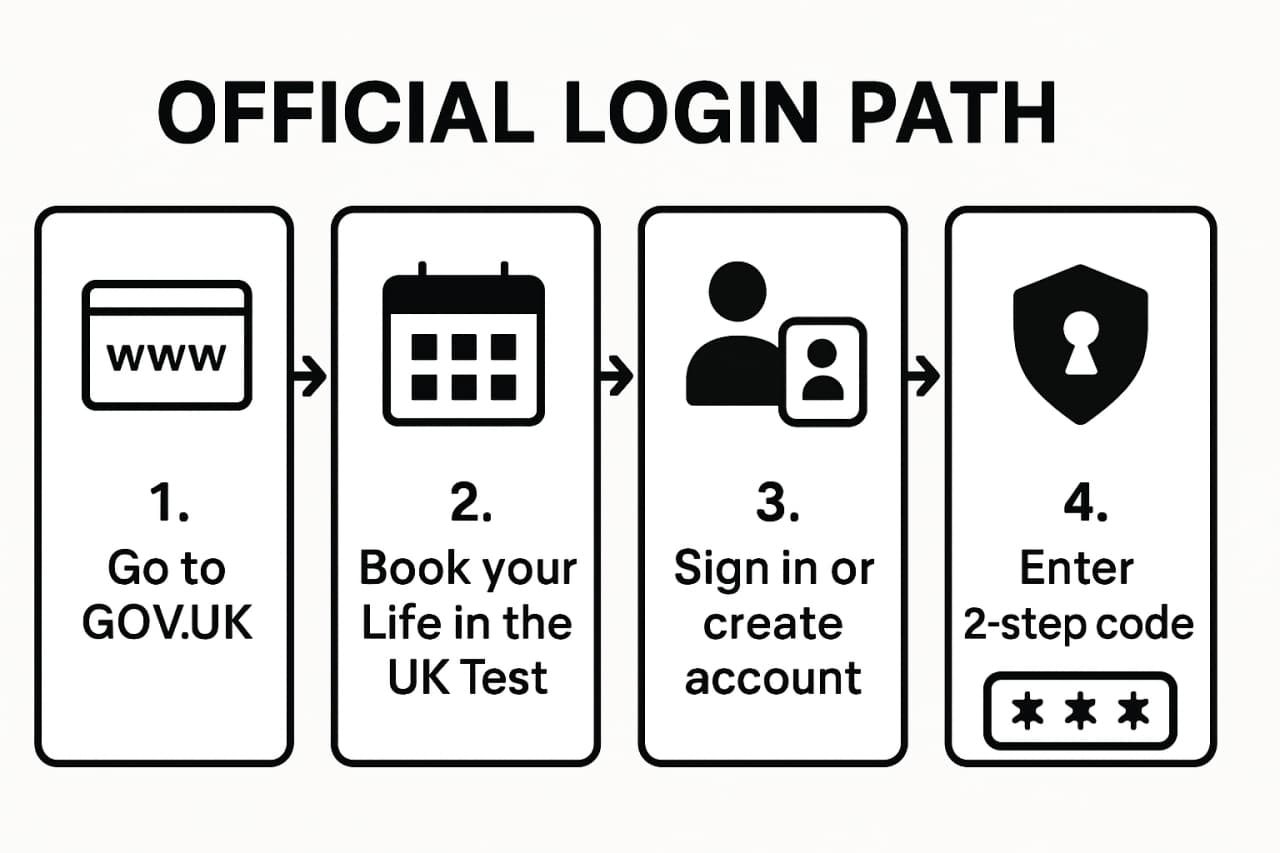
Find the correct service
- Start on GOV.UK Life in the UK Test.
- Use the official booking link.
- After that, expect to land on the PSI booking domain at
https://www.lituktestbooking.co.uk/lituk-web/.
That is the safe route. If a page claims to be official but does not start from GOV.UK or does not redirect to the PSI booking site, treat it as suspicious.
Confirm you are using the right account details
- use the exact email address you registered with
- use the same identity details you used to book
- if you booked with an eVisa, make sure the identity details match the share-code record
PSI's public guidance says registration details must exactly match your accepted ID or eVisa details.
Still need to study?
Keep revision moving while you sort out the account problem
The app gives you handbook-based revision, realistic mocks, and explanations, so a login issue does not automatically become a wasted study week.
- Use short mock sessions while the booking issue is being fixed
- Work on weak chapters instead of losing momentum to account admin
- Come back to the portal with a clearer idea of whether you are ready to book
Scan to download the app
Works on iPhone and Android


Sign in or create your test account
Sign in
- Open the booking route from GOV.UK.
- Enter your account email.
- Enter your password, or use the PSI password-reset flow if needed.
- If the portal asks for verification, complete the check and continue to the dashboard.
Create a new account
If you are new to the service:
- choose Create account
- enter your name exactly as it appears on the ID you will use
- add your email and mobile details
- complete the identity or verification steps PSI requests
GOV.UK says the booking name must exactly match the ID used to book the test.
eVisa and identity checks
Current official guidance says:
- if you use an eVisa, you should book using a UKVI share code
- PSI's FAQ says the share code used for registration must begin with S
- PSI also says the portal uses Entrust identity verification, with a desktop verification fallback if the app route does not work
Source: GOV.UK Life in the UK Test, PSI FAQ.
Fix the most common login and account problems
Incorrect email or password
Start with the simplest checks:
- search your inbox for older PSI booking emails to confirm the account address
- use the official password-reset route instead of repeated guesses
- try a clean browser session if autofill is looping the wrong details
PSI cannot find your account
This usually means one of three things:
- you registered with another email
- you never finished the original account setup
- the identity details do not match what PSI expects
If you are unsure, search old emails for lituk, PSI, or Life in the UK Test.
You need to change your name or date of birth
This one matters. PSI's current terms say that once an appointment exists, you cannot change your first name or date of birth on that booking.
If those details are wrong, the practical fix is:
- cancel the booking if needed
- create a new account
- rebook with the correct details
PSI says other personal details can be changed up to 24 hours before the appointment.
Identity verification failed
If the booking flow fails during ID verification:
- check that your name and date of birth exactly match the ID or eVisa details
- if you are using an eVisa, make sure the share code is the right type
- if the app route fails, PSI says desktop verification is available
Account locked or disabled
PSI's terms say it can disable a user ID or password in some circumstances. PSI does not publish a public lockout timer, so the safest response is:
- stop repeated attempts
- use password reset once
- contact PSI support if access still does not return
Reset your password safely
- only start the reset from the official GOV.UK route or the PSI booking site
- check that the page is on
lituktestbooking.co.uk - search spam or promotions folders for the reset email
- use the newest reset message if more than one arrives
Manage bookings after you sign in
Once logged in, you can normally:
- start a booking
- view existing bookings
- rearrange a booking
- cancel a booking
Start a new booking
Current official rules still say:
- book at least 3 days in advance
- the test fee is £50
- bring the same original ID you used when booking
Need a walkthrough? Use our booking guide and test-centre guide.
View and manage existing bookings
GOV.UK says you can cancel for a refund only if you do it at least 72 hours before the appointment. Inside that window, a cancellation or rearrangement is non-refundable.
If you need the full refund rules, see cancellations, refunds and complaints.
Use the downtime
Turn account trouble into productive study time
While PSI or GOV.UK account issues are being sorted, the app helps you keep moving with mock tests, explanations, and handbook revision instead of losing the whole week.
- Use timed mocks so booking decisions are based on scores, not frustration
- Improve weak chapters before your next login attempt succeeds
- Be ready to book or sit the test as soon as account access is back
Scan to download the app
Works on iPhone and Android
Keep the account secure and avoid fake sites
- always begin on GOV.UK
- expect the official redirect to PSI
- never type card or ID details into a lookalike ad site
- keep your account email and phone access current
Quick FAQs
Can I recover my account if I lost access to the email address?
Start with password reset. If you no longer control the email, contact PSI and be ready to prove who you are.
Can I change the first name or date of birth on my booking?
Not on an existing booking. PSI's terms say those details cannot be changed once the appointment exists.
What if my eVisa route is causing problems?
Check that you are using the correct share-code route and that the details match exactly. PSI's FAQ says the share code must begin with S.
When should I cancel or rearrange to get a refund?
At least 72 hours before the appointment. Otherwise, the booking becomes non-refundable.
Where do I get help?
Use PSI support:
support@lituk.psionline.com0800 015 4245- Monday to Friday, 8am to 8pm
Last updated
April 9, 2026