Life in the UK Test Unique Reference Number (URN): How to Get Yours
Your life in the uk test unique reference number explained: where to find it, how to use it for ILR/citizenship, and fix delays fast. Learn how now.
Pass the Life in the UK Test and you’ll receive a Unique Reference Number (URN). It’s the code the Home Office uses to verify your pass when you apply for ILR or British citizenship, so you need to know where to find it and how to enter it correctly.
This guide gives you the quick answer first, then walks through where the URN appears, what to do if it’s delayed, and how to avoid common form mistakes. If you have not taken the test yet, the fastest way to get your URN is still the same: pass first time.
Quick answer: where your URN comes from and when you get it
What is it? Your Life in the UK test unique reference number is the official code that proves you passed. The Home Office uses it to verify your result electronically when you apply for indefinite leave to remain (ILR) or British citizenship.
- When you get it: After you pass (score 75%+), your URN is issued. For tests on/after 17 December 2019, it is available in your results email and PSI Life in the UK account. If you took the test before 17 December 2019, you’ll have a results letter with a test reference ID instead.
- Where to find it: In your post-2019 results email or after signing in to your PSI Life in the UK account, look for the label “Unique Reference Number (URN)”. The code commonly looks like
HOM/010114/123456/123456789. For pre-2019 tests, use the 7-digit test reference ID shown on the letter. - What to do with it: Enter the URN exactly as shown in your ILR or citizenship application. No extra spaces or missing characters.
Official guidance confirms you’ll receive a unique reference number after passing and that the Home Office will use it to check you’ve passed.
Still preparing?
Pass the Life in the UK Test first time and get your URN
If you have not taken the test yet, use our Life in the UK mobile app to prepare and pass it on your first attempt.
- Practice realistic mocks before you book
- Fix weak topics before they cost you a retest
- Walk into the test ready to collect your URN and move on
Scan to download the app
Works on iPhone and Android


What is the URN and why it matters
Think of the URN as your test-pass fingerprint. It uniquely links you to a verified pass and lets Home Office caseworkers confirm your result directly in their systems. You’ll need it for ILR or naturalisation.
What the URN proves
Definition: The URN is the official proof of your Life in the UK pass, tied to your identity, which caseworkers check electronically during your application processing. No certificate upload is required; the URN is the evidence they match against their records.
URN vs booking reference vs candidate ID
Avoid mixing up numbers on forms. Here’s how they differ:
| Number | Where you see it | What it’s for | Typical format |
|---|---|---|---|
| URN (Unique Reference Number) | Results email and PSI account (displayed next to your test result) | Enter on ILR/naturalisation forms so the Home Office can verify your pass | Often like HOM/010114/123456/123456789 |
| Booking reference | Booking confirmation email/account | Managing your test appointment (not used on ILR/citizenship forms) | Alphanumeric (varies) |
| Candidate ID | Test centre or account profile | Centre/admin identification (not your proof of passing) | Alphanumeric (varies) |
Does the URN expire?
No. There’s no expiry on a Life in the UK pass. Because you may need the number again, keep it safely stored for future applications. For more detail, see our guide on how long the Life in the UK Test is valid for.
Step-by-step: how to find your URN after you pass
Start by checking when you passed the test. You only need to follow one of the two routes in Step 2 before moving on to Step 3.
Step 1: Check when you passed the test
If you sat the test before 17 December 2019, follow Step 2A. If you sat it on or after 17 December 2019, follow Step 2B. The process changed on that date: older passes were issued with a printed pass notification letter, while newer passes are shown in your PSI account and results email.
Step 2A: If you passed before 17 December 2019, check your pass notification letter
Your number may appear on a pass notification letter labelled “Unique Reference Number (URN)” or “test reference ID”. For pre-2019 tests, that reference was a 7-digit number at the top of the letter.
Step 2B: If you passed on or after 17 December 2019, sign in to your official booking account
PSI no longer issues pass letters for these tests. Instead, sign in to your PSI Life in the UK (LitUK) account to view your result. Your URN will be displayed alongside the result and is the code you must use in your application.
Step 3: Confirm the exact label you’ll see
- For tests on/after 17 December 2019, look for “Unique Reference Number (URN)” in your results email or PSI account.
- The post-2019 format usually looks like
HOM/010114/123456/123456789. - For tests before 17 December 2019, the letter shows a 7-digit “test reference ID”. Use that where applications ask for your Life in the UK reference.
- Do not enter your booking reference or candidate ID by mistake.
Step 4: Match your personal details
Make sure your full legal name, date of birth and the ID type/number in your account or letter match your passport/BRP. If anything differs (e.g., middle name missing or diacritics), ask support to correct it before you submit your URN—this helps prevent verification delays.
Step 5: Save a secure digital copy
Take a clear scan or photo of the email/letter showing the URN and store it in an encrypted drive. Keep any original letter safe. This gives you a quick backup if you change devices or email addresses later.
Haven’t received your URN? What to do in the next 24–72 hours
If you passed but can’t see your URN, work through these checks to get it fast—without booking a new test.
Same-day issues at the test centre
- Misprint or name error spotted on the day: Raise it immediately with staff so they can correct your profile before results sync.
- Results held for checks: Occasionally, results are reviewed for ID mismatches. Ask when to expect the email and whether you need to submit any documents.
- No printout given: That’s normal post-2019. Your URN should arrive by email and appear in your PSI account.
Contacting official support (what info to provide)
Contact PSI via the booking portal if your URN hasn’t appeared within 24–72 hours. Prepare:
- Full name (as booked) and date of birth
- Test date, time and centre
- ID type and last four digits of the ID number used
- Booking email address and phone number
- Screenshot of your account page (if possible)
Need phone/email routes? Use our roundup of official Life in the UK Test contact options.
Common reasons for delays and fixes
- Name mismatch: Ask support to update your record to match your passport/BRP exactly, then re-check your account.
- ID discrepancy: If a different ID was presented on the day, verification may pause. Provide scans if requested.
- System sync lag: Allow 24–72 hours. Check spam/junk folders and whitelist PSI emails.
- Wrong email on file: Update your account email and request the results notification be re-sent.
When to escalate—and what not to do
- Escalate after 72 hours if nothing appears, attaching evidence of your pass screen and test details.
- Do not book a new test just to get a URN; a new booking costs £50 and isn’t needed if you already passed.
Still need to pass?
Avoid paying for a retest later
If you have not passed the Life in the UK Test yet, download our app, get ready for your test, and finally get your URN and move on with your application.
- Train with realistic mock tests before you book
- Catch weak topics before they cost you another £50
- Study the official handbook and learn the key facts
- Walk into test day ready to pass and receive your URN
Scan to download the app
Works on iPhone and Android
How and where to use your URN in ILR or citizenship applications
Once you have your URN, you’ll enter it in the Life in the UK section of the online form (ILR or Form AN for naturalisation). Caseworkers use it to verify your pass, so accuracy matters.
Entering your URN on the form
- Field label is typically “Unique reference number (Life in the UK test)”.
- Enter the full string in the exact format shown (e.g., include “HOM/” and any slashes).
- Avoid typos: copy–paste from the email, then manually check for extra spaces before/after.
- If your test was pre-2019, use the 7-digit test reference ID where the form requests your Life in the UK reference.
Sharing your URN with a solicitor or representative
- Share via encrypted email, secure client portals, or password-protected files.
- Provide your full legal name and DOB alongside the URN to reduce back-and-forth.
- Avoid messaging apps that sync to multiple devices unless protected with strong device security.
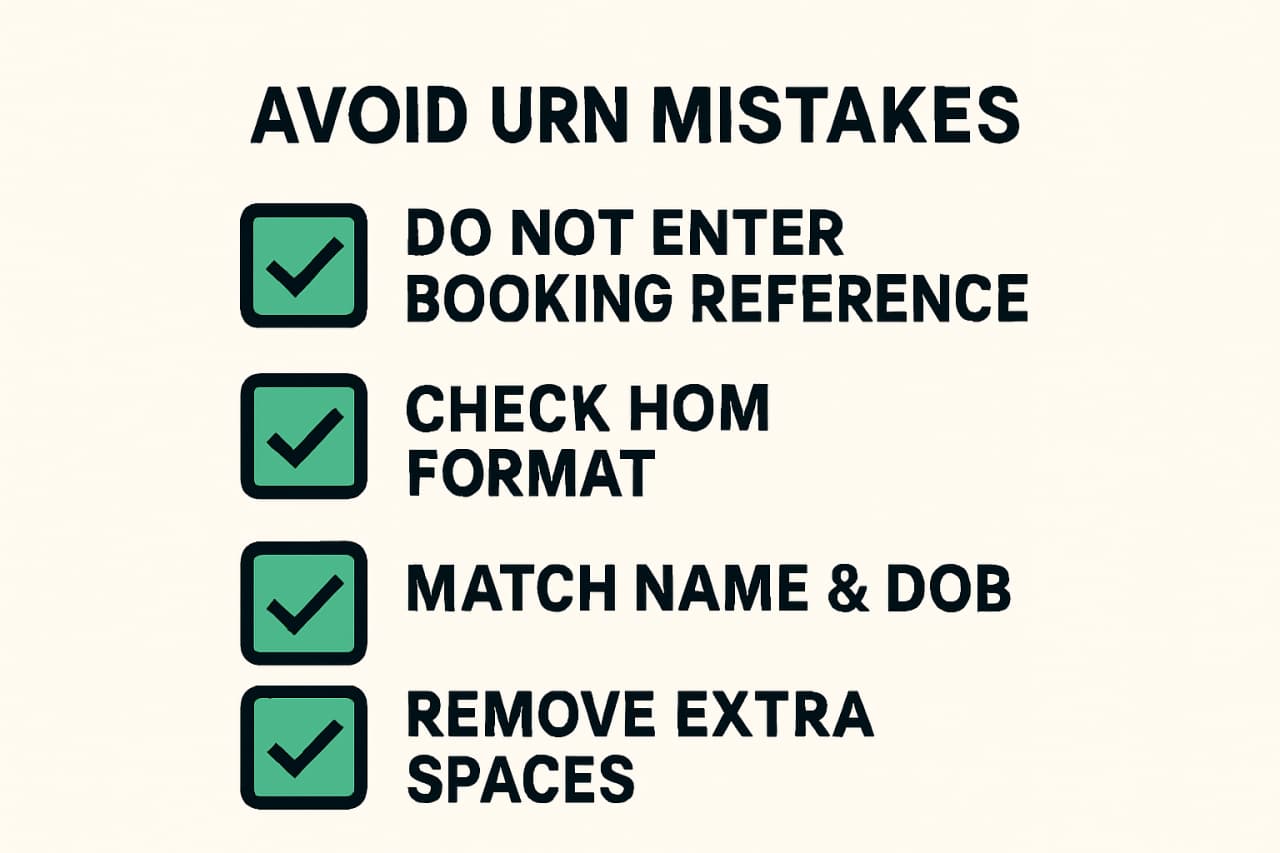
Avoid these common errors
- Entering the booking reference instead of the URN.
- Missing characters in the HOM/ format or adding spaces.
- Submitting with a nickname that doesn’t match your passport/BRP.
- Transposing digits—double-check against the email or account page.
Security: how to store and share your URN safely
Your URN links to identity information and application records. Treat it like a sensitive document.
Keep the original letter and a secure backup
- Store any original pass letter in a fire/water-resistant folder at home.
- Create an encrypted digital backup (e.g., password-protected PDF in a secure cloud drive).
- Label files clearly, e.g., “Life-in-the-UK-URN-YYYYMMDD”.
What to redact when emailing copies
- If you must email, consider redacting parts of your address or document numbers not required by your solicitor.
- Use password-protected attachments and share the password via a separate channel.
Who may legitimately ask for your URN
- Home Office application forms and caseworkers
- Your regulated solicitor or accredited representative
- Do not share it publicly or with unverified third parties
Frequently asked URN questions
What is my URN number?
It’s the Life in the UK Test unique reference number shown in your results email and PSI account after you pass. It uniquely links your identity to a verified pass that the Home Office checks during ILR or citizenship processing.
Is a photocopy or scan of my pass letter enough?
For post-2019 tests, the URN in your email/account is what matters. If you have a pre-2019 letter, scans are fine to share with a solicitor, but keep the original safe in case you’re asked to reference it later.
Can I verify my URN with the Home Office?
You don’t need to pre-verify. The Home Office checks your URN electronically during casework. Just enter the number exactly as shown in your application.
Do I need the URN for future applications?
Yes, keep it. Life in the UK passes don’t expire, and you may be asked for the URN again for later applications or correspondence.
Last updated
April 6, 2026